
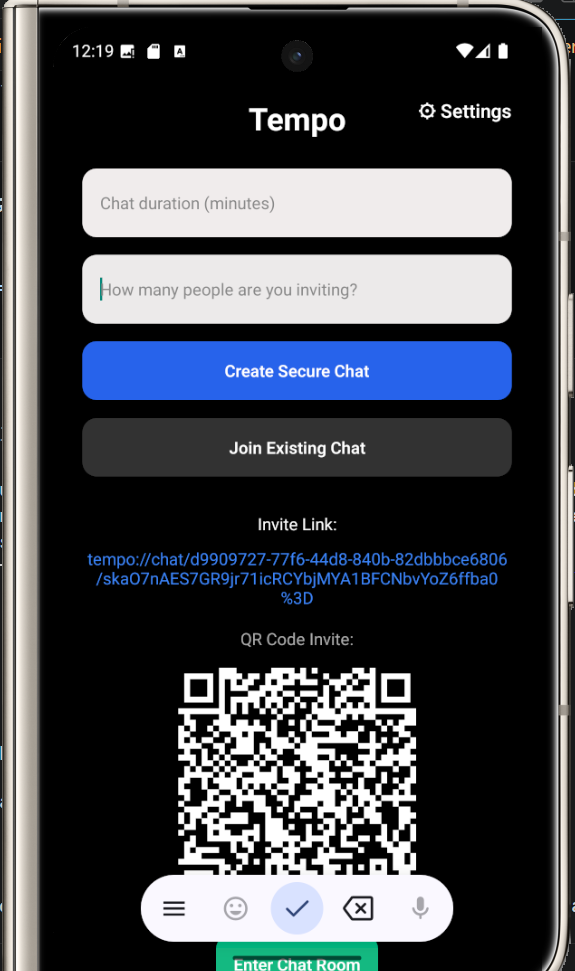
Features
- Encryption
- Limited number of invitees and strict enforcement
- Chat duration
- Auto and self complete destruction.
- File access control
- View once file option(new changelog)
- Screenshots prohibition
- Screen Record prohibition
- Shearable link and Qr scan
- No profile linking to the user
Note: Taking picture with another device is not restricted, however, chats are not traced to any profile.
Private Conversations. Built to Disappear.
Tempo is a privacy-first messaging platform designed for conversations that are temporary by design.
Unlike conventional messaging applications where conversations can remain stored indefinitely, Tempo gives users control over how long a conversation exists.
Users can create a conversation, choose how long it should remain available, and share the conversation link with the person they want to chat with. Once the configured time expires, Tempo automatically removes the conversation and its associated content from the application.
No profile- just a random number. No conventional social feed. No digital history.
Just a private conversation with an expiration time.
How Tempo Works
Tempo is built around one simple idea:
Not every conversation needs to exist forever.
To start a conversation, the sender creates a Tempo chat and sets its duration.
The sender then shares the generated conversation link with the person they wish to communicate with.
For the recipient to participate, Tempo must already be installed on their device.
Once both participants are connected, they can communicate within the temporary conversation.
When the conversation timer reaches zero, Tempo automatically wipes the conversation and its associated content from the application.
1. Create a Conversation
Open Tempo and create a new conversation.
You decide how long the conversation should remain active.
The available duration is determined by the options provided within Tempo.
2. Share the Conversation Link
Tempo generates a conversation link.
Send the link to the person you want to chat with through your preferred communication method.
The recipient must have Tempo installed to access the conversation.
3. Start Messaging
Once the recipient joins the conversation, you can communicate privately through Tempo.
Messages are encrypted to help protect the contents of your conversation.
Tempo is designed without a conventional public-facing user profile, helping minimize the amount of profile information associated with a conversation.
4. Let the Conversation Expire
Every Tempo conversation has a lifetime.
When the timer reaches its end, Tempo automatically removes the conversation and its associated content.
You don’t have to manually clean up the conversation.
The timer handles it.
Don’t Want to Wait?
Tempo also provides self-destruct controls for users who want to end a conversation before its original timer expires.
Instead of waiting for the countdown to reach zero, an eligible user can trigger the available self-destruct option.
Once activated, the conversation is immediately terminated according to Tempo’s deletion and expiration system.
This gives users greater control over when their temporary conversation ends.
Privacy by Design
Tempo was designed around privacy from the beginning.
No Conventional User Profile
Tempo does not rely on the traditional social-media-style profile that publicly identifies users through usernames, photos, follower lists, or public activity.
The goal is to keep the focus on the conversation rather than building a permanent social identity around it.
Encrypted Messages
Messages exchanged through Tempo are encrypted to protect their contents while they are being communicated through the platform.
Temporary Conversations
Conversations are designed to have a defined lifetime rather than remain available indefinitely.
When the conversation expires, Tempo removes the associated content according to its deletion system.
Screenshot & Screen Recording Protection
Tempo includes protections designed to prevent screenshots and screen recording while users are viewing protected conversations.
This helps reduce the ability to casually capture and retain conversation content through the device’s standard screen-capture features.
Controlled File Viewing
Files shared through Tempo are subject to sender-controlled viewing permissions.
A recipient cannot simply assume that a shared file is permanently available to them. File access can be controlled by the sender through Tempo’s permissions system.
A Different Kind of Messaging
Traditional messaging applications are designed around persistence.
Messages accumulate.
Conversations remain in inboxes.
Old attachments remain accessible.
Your profile becomes associated with years of communication.
Tempo takes a different approach.
Temporary by Design
Conversations have a defined lifespan.
Private by Design
Messaging is built around privacy rather than public profiles and social activity.
Controlled by the User
Users determine how long their conversations remain available and can use available self-destruct controls when they want to end a conversation earlier.
Minimal Identity
Tempo does not require the traditional public-facing profile associated with conventional messaging and social platforms.
Installing Tempo
Tempo Is Currently Not Available on Google Play
Tempo is currently distributed directly as an Android APK and is not hosted on the Google Play Store.
Because of this, installation is slightly different from downloading a conventional Android application from Google Play.
You must obtain the official Tempo APK from an authorized Tempo source.
Do not install APK files obtained from unofficial websites or unknown third parties.
Android Installation Guide
Step 1 — Download Tempo
Obtain the official Tempo APK from the authorized Tempo distribution source.
Download the file directly to your Android device.
Step 2 — Locate the APK
Open your device’s:
Downloads folder
Files application
File Manager
Locate the downloaded Tempo APK.
Step 3 — Begin Installation
Tap the Tempo APK.
Android may display a security notification because the application was not downloaded through Google Play.
If Android asks you to allow installation from unknown sources, enable it, follow the device’s instructions to enable the installation.
Then return to the APK and continue.
Step 4 — Complete Installation
Allow Android to install Tempo.
Once installation has finished, open the application.
Step 5 — Activate Tempo
Tempo requires a valid activation code.
Enter your activation code when prompted and complete the activation process.
Tempo Activation Code
One-Time Activation — ₦50,000
Tempo requires a one-time activation payment of ₦50,000.
This is not presented as a monthly payment.
After making the payment, send your proof of payment to:
tempo@nexora.com.ng
Your email should include:
Proof of payment
Any relevant payment reference
The Tempo team will verify the payment and provide the required activation details via the same email.
Activation Process
Getting started is simple.
01 — Make Payment
Pay the one-time Tempo activation fee of:
₦50,000
02 — Send Proof
Email your payment receipt or proof of payment to:
03 — Receive Activation Details
After payment verification, your activation details will be provided.
04 — Install Tempo
Download and install the official Tempo APK on your Android device.
05 — Activate
Enter your activation code inside Tempo.
06 — Start a Conversation
Create a temporary chat, choose its duration, and share the generated link with your intended recipient.
Frequently Asked Questions
What is Tempo?
Tempo is a privacy-focused messaging platform designed for temporary conversations. Users can create conversations with a defined duration and have the conversation automatically removed when its timer expires.
Does Tempo require a profile?
Tempo is designed without the conventional public-facing profile system found in many messaging and social-media platforms.
How does someone join my conversation?
Create a Tempo conversation and share the generated link with the person you want to chat with.
The recipient must have Tempo installed.
Do conversations remain permanently?
Tempo is designed around temporary conversations. When the conversation timer expires, the conversation and associated content are removed according to Tempo’s deletion system.
Can I end a conversation before the timer expires?
Yes. Tempo provides self-destruct functionality for users who want to terminate an eligible conversation before its scheduled expiration.
Are Tempo messages encrypted?
Yes. Tempo uses encryption to protect message content.
Can people take screenshots?
Tempo includes protections intended to disable screenshots and screen recording within protected areas of the application. However, no software can guarantee that information displayed on a physical screen can never be captured by another device or external method.
Can recipients freely view files I send?
Tempo provides sender-controlled file viewing permissions, allowing the sender to control access to shared files.
Is Tempo on Google Play?
No. Tempo is currently distributed directly as an Android APK.
How much does activation cost?
Tempo activation costs ₦50,000 as a one-time activation fee.
Where do I send my payment receipt?
Send your proof of payment to:
Important Privacy Notice
Tempo is designed to provide temporary and privacy-focused communication.
Tempo’s privacy features are intended to reduce persistent digital exposure and provide users with greater control over temporary conversations.
Users should always use messaging platforms responsibly.
Start Your Private Conversation
Install Tempo.
Create your conversation.
Choose its lifetime.
Share the link.
Chat privately.
When the time is up, the conversation disappears.
One-Time Activation: ₦50,000
For payment verification and activation:
Tempo
Conversations don’t have to last forever.